Deploy to a server
A step-by-step guide to running Clinical Care Navigator on a Linux server behind
HTTPS. It uses the repository's compose.prod.yaml, which builds the API and the
web app and publishes no host ports: a reverse proxy is the only way in.
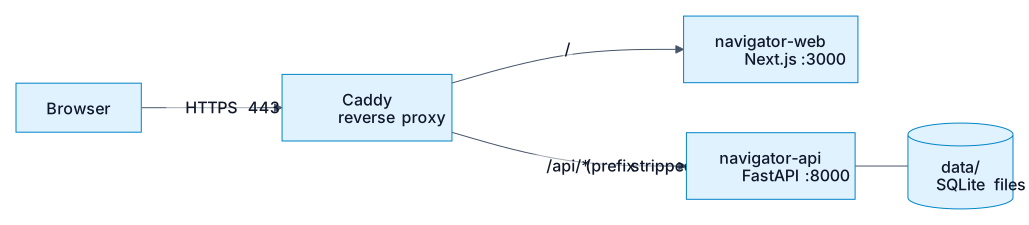
The browser talks to one origin. The proxy sends /api/* to the API (removing the
/api prefix, because the API itself has no such prefix) and everything else to
the web app.
How this was checked
Both images were built from the repository's Dockerfiles, started with
compose.prod.yaml behind a Caddy container, and exercised in a browser:
the site and /api/healthz through the proxy, a full live run with its steps
streaming in as they happened, a reload replaying that run, no host ports
reachable, and the basic-auth rules below. That ran on a local machine with
plain HTTP, so automatic HTTPS certificates, DNS and a public firewall were
not exercised; those parts rely on Caddy's documented behaviour.
1. What you need
- A Linux server with a public IP, reachable by SSH.
- A domain name with an
Arecord pointing at the server (for exampleclinical.example.com). - Docker Engine with the Compose plugin
(
docker compose versionshould work). - An OpenAI API key.
- Ports 80 and 443 open to the internet, and nothing else except SSH.
2. Get the code onto the server
The continuous-deployment workflow publishes the API image to GitHub Container Registry but not the web image, and its server-deploy job is still a placeholder. So this guide builds both images on the server.
3. Put the data on the server
The API reads three read-only databases from data/ (records.db,
education.db, policy.db) and writes two of its own there at runtime
(runs.db and checkpoints.db). data/ is git-ignored and excluded from the
image, so you have to provide it. Pick one option.
Needs uv and outbound internet access (it
downloads the public Synthea sample data and education pages).
On the machine where you already ran make data, copy only the three
read-only databases:
rsync -av \
  --include='records.db' --include='education.db' --include='policy.db' \
  --exclude='*' \
  data/ you@your-server:~/clinical_care_navigator/data/
Do not copy runs.db or checkpoints.db: they are the other machine's run
history and paused reviews.
The API container runs as user 1000, so that user must be able to write to
data/:
Without this the API exits at startup with
sqlite3.OperationalError: unable to open database file and
Application startup failed.
4. Configure
Create .env in the repository root. It is read by docker compose for the API
container, and the two WEB_PUBLIC_* lines are also used as build arguments
for the web image.
# --- API (runtime) ---
NAVIGATOR_OPENAI_API_KEY=sk-...
NAVIGATOR_ENVIRONMENT=production
NAVIGATOR_FRONTEND_ORIGINS='["https://clinical.example.com"]'

# --- Web (baked into the JavaScript at build time) ---
WEB_PUBLIC_API_URL=https://clinical.example.com/api
WEB_PUBLIC_DOCS_URL=https://zarreh.ai/clinical_care_navigator/
| Variable | Why it matters |
|---|---|
NAVIGATOR_OPENAI_API_KEY |
Without it, runs that need the model fail. |
NAVIGATOR_ENVIRONMENT |
Anything other than development switches logs to JSON. |
NAVIGATOR_FRONTEND_ORIGINS |
CORS allow-list as a JSON list. Outside development this is the only thing trusted (localhost is not). Because the proxy serves the site and the API from one origin the browser does not need CORS, but set it to your public origin anyway. |
WEB_PUBLIC_API_URL |
Where the browser calls the API. Must be the public URL ending in /api. The default, http://localhost/api, only works on the server itself. |
WEB_PUBLIC_DOCS_URL |
Target of every "Learn more" and Docs link. Point it at wherever you host the documentation site. |
Optional: NAVIGATOR_LANGSMITH_API_KEY for tracing, NAVIGATOR_AUTONOMY_LEVEL,
and the rate limits (see Run it yourself).
The two WEB_PUBLIC_* values are build-time
Next.js inlines them into the bundle. Changing them in .env does nothing
until you rebuild the web image (docker compose -f compose.prod.yaml up -d --build).
A site whose API calls go to localhost was built without
WEB_PUBLIC_API_URL.
Keep .env out of git
It holds your API key. It is already git-ignored and excluded from the images.
5. Set up the reverse proxy
compose.prod.yaml attaches both services to an external Docker network
named edge. Create it once, then run a proxy on it. These services are named
navigator-api and navigator-web so they don't clash with other apps sharing
the network.
Create a directory for the proxy, for example ~/proxy, with two files.
~/proxy/compose.yaml:
services:
  caddy:
    image: caddy:2
    restart: unless-stopped
    ports:
      - "80:80"
      - "443:443"
    volumes:
      - ./Caddyfile:/etc/caddy/Caddyfile:ro
      - caddy_data:/data        # certificates live here
      - caddy_config:/config
    networks:
      - edge

volumes:
  caddy_data:
  caddy_config:

networks:
  edge:
    external: true
~/proxy/Caddyfile:
clinical.example.com {
    handle_path /api/* {
        reverse_proxy navigator-api:8000 {
            flush_interval -1
        }
    }

    handle {
        encode zstd gzip
        reverse_proxy navigator-web:3000
    }
}
Two details matter here:
handle_pathstrips/apibefore forwarding. Without it the API sees/api/conversationsand returns 404.flush_interval -1sends the live run stream through immediately instead of buffering it, andencodeis deliberately kept off the/apiroutes so the stream is never compressed into a lump.
Caddy also requests and renews the HTTPS certificate for the domain by itself.
Start it:
Using nginx instead (not tested here)
The same four requirements apply: strip /api, do not buffer the stream,
and set the client address rather than appending to what the client sent.
location /api/ {
    proxy_pass http://navigator-api:8000/;      # trailing slash strips /api
    proxy_http_version 1.1;
    proxy_set_header X-Forwarded-For $remote_addr;
    proxy_set_header Host $host;
    proxy_buffering off;                        # server-sent events
    proxy_read_timeout 120s;
}
location / {
    proxy_pass http://navigator-web:3000;
    proxy_set_header X-Forwarded-For $remote_addr;
    proxy_set_header Host $host;
}
6. Start the app
From the repository root:
The first build takes a few minutes. The web container waits for the API's health check to pass before it starts.
Check it:
docker compose -f compose.prod.yaml ps          # both should say "healthy"
curl https://clinical.example.com/api/healthz   # {"status":"ok"}
docker compose -f compose.prod.yaml exec navigator-api printenv NAVIGATOR_FRONTEND_ORIGINS
Then open https://clinical.example.com/, run one of the example questions, and
confirm the steps appear one by one and a result card shows up. A live run takes
roughly 15–40 seconds.
To demonstrate the clinician review queue, which is normally empty, load three sample drafts (scripted, no model call):
7. Protect the clinician review queue
Do this before the site is public
The app has no login. Anyone who can reach /reviews can approve, edit or
decline a held answer. Putting basic auth at the proxy covers both the page
and the API calls the page makes.
Generate a password hash, then add a basic_auth block to the site in your
Caddyfile (above handle_path):
clinical.example.com {
    @reviews path /reviews /reviews/* /api/reviews /api/reviews/*
    basic_auth @reviews {
        clinician <paste-the-hash-here>
    }

    handle_path /api/* {
        # ...unchanged...
    }
    handle {
        # ...unchanged...
    }
}
With this in place the home page and /api/healthz stay public, while
/reviews and every /api/reviews… request (including the decision POST)
return 401 without credentials. The visitor-facing questions are unaffected.
Do not try to protect the API with a key in browser code: anything in the
browser is visible to everyone.
8. Operate it
Logs
Update to a new version
data/ is untouched. Any run in flight during the restart cannot finish; on
startup the API marks it failed ("interrupted by a server restart") and puts a
review that was mid-decision back in the queue, so nothing spins forever.
Back up
runs.db (conversation history and the review queue) and checkpoints.db (the
paused state a held review resumes from) belong together: a review points into the
checkpoint database. Back them up as a pair. The other three databases are
rebuildable with make data.
mkdir -p backups
sqlite3 data/runs.db        ".backup 'backups/runs-$(date +%F).db'"
sqlite3 data/checkpoints.db ".backup 'backups/checkpoints-$(date +%F).db'"
Reset the history
Stop the stack, then delete runs.db, checkpoints.db, checkpoints.db-wal and
checkpoints.db-shm together. Deleting only one leaves held reviews that can
no longer be resumed.
Run one API process. Runs execute inside the API process and the stores are
SQLite files, so do not scale navigator-api to several replicas or workers.
9. Troubleshooting
| Symptom | Likely cause and fix |
|---|---|
API container exits with unable to open database file |
data/ is not writable by user 1000. Run sudo chown -R 1000:1000 data. |
The page loads but every question fails, or the browser tries localhost |
WEB_PUBLIC_API_URL was missing or wrong when the web image was built. Fix .env and rebuild with up -d --build. |
404 on every API call through the proxy |
The proxy is not stripping /api. Use handle_path (Caddy) or a trailing slash on proxy_pass (nginx). |
| The run seems to hang, then everything appears at once | The proxy is buffering the event stream. Use flush_interval -1 (Caddy) or proxy_buffering off (nginx), and do not compress /api. |
| The page says "the API did not answer" while the API is up | The browser blocked the call because the page's origin is not in NAVIGATOR_FRONTEND_ORIGINS. Add the exact public origin (scheme and host, no path) and restart the API. |
Everyone gets 429 Too many requests |
The rate limit is per client address. If the proxy does not pass the real client address, all visitors share one bucket. Make the proxy set X-Forwarded-For (Caddy does by default). Also see the limits in Run it yourself. |
| Runs fail with an authentication error from the model | NAVIGATOR_OPENAI_API_KEY is missing or wrong in .env. Recreate the container after fixing it: docker compose -f compose.prod.yaml up -d. |
| "Docs" links go to the wrong place | Set WEB_PUBLIC_DOCS_URL and rebuild the web image. The documentation site itself is published to GitHub Pages by the CD workflow; use whatever URL it ends up at. |
10. Security notes
- The API trusts
X-Forwarded-Forfrom any peer (--forwarded-allow-ips "*") so the per-client rate limit sees real visitors. That is safe only because no host port is published and the proxy replaces the header; both were checked: a spoofedX-Forwarded-Forsent through Caddy arrives replaced by the real address. Never publish the API port directly. - Open only 22, 80 and 443 in the server firewall.
- The patient is a choice among demonstration personas, not a login: the API only
answers as those personas (
NAVIGATOR_DEMO_PATIENTS_ONLY, on by default), but it cannot tell who is asking. See Choose who you are asking as. - The data is entirely synthetic, and the app states it is not a medical device. Do not point it at real patient records: there is no setting for that and no login, audit trail or access control that real data would require.